
Sell by Measure
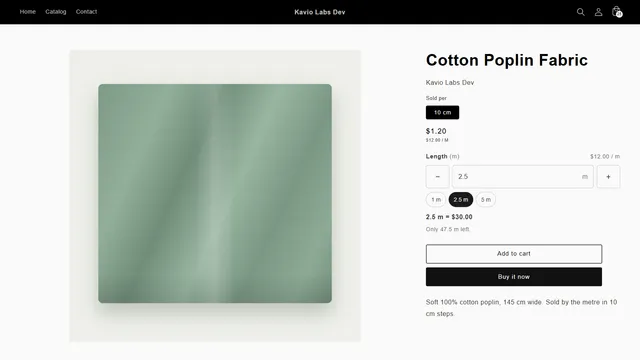
An amount input with a live price, Shopify unit prices and a checkout check for minimum and maximum amounts.
Free planView the app : Sell by Measure
Platforms
 CS-CartAdd-ons and themes for CS-Cart and Multi-Vendor
 OpenCartExtensions and themes for OpenCart 4 and 3
 WooCommercePlugins and themes for WooCommerce
 PrestaShopModules and themes for PrestaShop 8.2 and 9
 ShopifyBuilt for every Shopify plan, billed by Shopify
Stores
Shopify app · Engraving & Monogram Personalizer
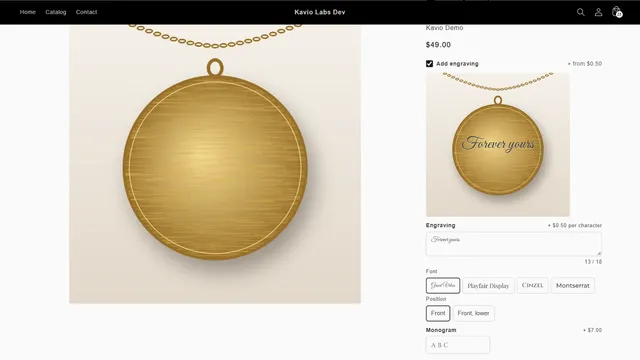
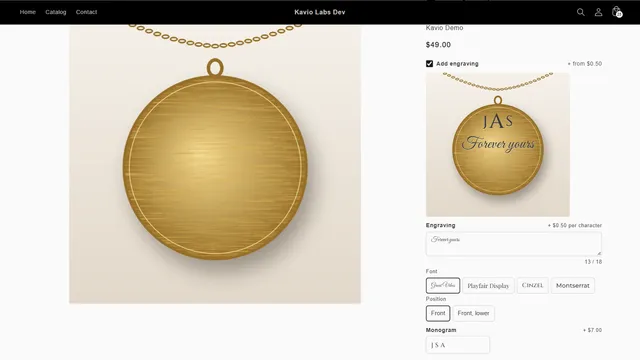
Shoppers type their words, pick a font and see the engraving on the product photo as they type. You charge an honest add-on price and print one production sheet for the workshop.
The problem
A text box on the product page collects the engraving, but the shopper cannot see the result, nothing checks the length or the characters, and charging for it means another variant.
The workshop then gets texts with typos and impossible lengths, and orders wait while you write to the customer.
Engraving & Monogram Personalizer
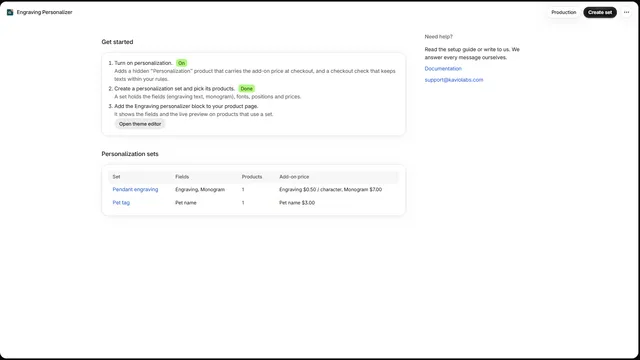
One click sets up the add-on price at checkout and the checkout rule.
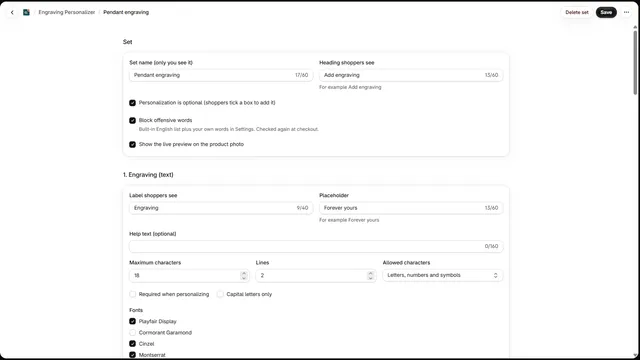
Add text and monogram fields, fonts, positions and the add-on price, then pick products or collections.
Values show on the order, e-mails and packing slips. Print the production sheet for your workshop.
In gold, silver or engraved style, on the front, back, inside or lower third.
Script, serif, sans and typewriter styles; let shoppers choose or fix one per field.
Classic (first, LAST, middle), block, circle and single letter, with the right letter order.
Up to 6 fields per set: characters, lines, allowed characters, capitals only, required or optional.
Fixed when filled, or per character with free characters; Shopify computes it.
Every engraving text of your open orders on one printable sheet.
Engraving & Monogram Personalizer
A line item property gives you a text box. It does not show the shopper what they get, cannot charge per character, and does not stop a typo or an offensive word from reaching the workshop.
Engraving & Monogram Personalizer shows text on the product photo as the shopper types, in gold, silver or engraved finish. You choose the fields, character limits, fonts, monogram styles and positions, and charge a fixed price or a price per character. It is built for engraving and monograms: text and initials on a product you make or engrave yourself, not print-on-demand.
The add-on price uses Shopify’s cart transform, which is available on all plans, so the shopper cannot alter it in the browser.
| Plan | Includes |
|---|---|
| Free | Up to 3 personalized products, text and monogram fields, 12 fonts, live preview, values on cart, checkout, order and e-mails, word filter |
| Basic | Up to 50 products, add-on price, assignment by collection, production sheet, e-mail support |
| Pro | Unlimited products, printing production sheets for many orders at once, priority support |
Note that charging an add-on price needs a paid plan. On the free plan, personalization is free for the shopper. The app page shows current prices.
Fonts cover Latin letters, including the accented letters used in Western and Central European languages. If you sell in other scripts, this app is not the right fit.
To set up: add the block to your product template, create the fields, choose positions on the photo, and test on a phone. Use straight-on photos with a clear engraving area, since the preview draws on the product image.
| Line item property | Product options app | This app | |
|---|---|---|---|
| Live preview | No | Rarely | Yes |
| Per-character price | No | Sometimes | Yes |
| Add-on as its own checkout item | No | Varies | Yes |
| Word filter | No | Rarely | Yes |
| Production sheet | No | Rarely | Yes |
If you offer a free gift note on a few items, a line item property is enough. For artwork uploads, look for a print-on-demand or designer app, as this one handles only text and monograms. Store owners on other platforms can compare with CS-Cart, WooCommerce, OpenCart and PrestaShop versions.
Set character limits from a real test piece. Choose two or three fonts your machine handles well, because thin scripts can fill in on small plates. State your production time on the product page, and say whether personalized items can be returned; rules differ by market, so check with your adviser.
Run your first orders through the production sheet and compare with the finished item. That is the quickest way to find a limit or font that needs changing.
Every Shopify plan, no Plus features. Online Store 2.0 themes with app blocks. It requests read access to orders for the production sheet, with no customer fields, and nothing is stored on our server. On uninstall, the price function and checkout rule are removed, past orders keep their values, and the unpublished Personalization product stays in your list for you to delete.
Text reaches your team as line item properties, so look at what your staff actually see. Open a test order, check the e-mail, and print a packing slip. Packing slip templates show properties only if they include them, so you may need to adjust yours. On Basic and Pro, the production sheet avoids this, as it lists every text in one place.
The Personalization item at checkout is a separate line. If you use a fulfilment or accounting tool, check how that line appears there.
Shopify
Engraving text and monograms for Shopify with a live preview on the product photo, 12 fonts, an honest add-on price and a production sheet. Free plan.
Shopify
The most requested products on this platform. Each one has its own page, and you can buy it straight on the sales site.
An amount input with a live price, Shopify unit prices and a checkout check for minimum and maximum amounts.
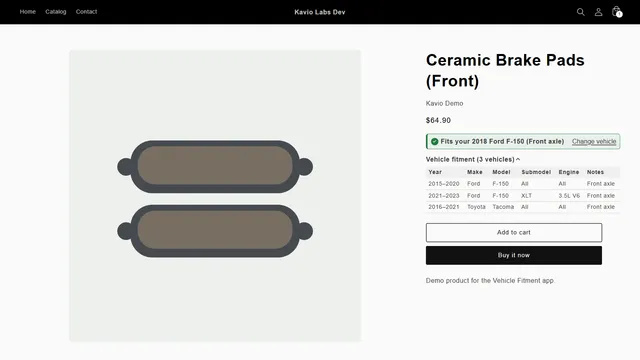
YMM search on your own collection pages, a fit badge on every product, My Garage and CSV import.
Prices, licences, full documentation and instant downloads are on the store.
apps.kaviolabs.com · 5 apps, each with a free plan
Engraving and monograms
Built natively for each platform, not ported. Each version has its own product page, documentation and price.
CS-Cart
Text, photo and choice fields on print areas with a live preview, server-rendered proofs and surcharges.
Names, dates and monograms previewed on the product photo, with fees, a word filter and a production sheet.
WooCommerce
Names, dates and monograms previewed on the product image, with server-checked fees and the block checkout.
PrestaShop
Names, dates and initials previewed on the product image, with fees checked on the server and a production sheet.
FAQ
Yes, on every plan. The add-on price uses Shopify’s cart transform for add-ons, which is available on all plans.
No. You pay the monthly plan through your Shopify invoice and nothing per order.
No. It is built for engraving and monograms: text and initials on a product you make or engrave yourself.
On the order in Shopify, in order e-mails and on packing slips that print line item properties. On Basic and Pro the production sheet lists them all.
At checkout the item keeps its own price, and a Personalization item carries the add-on price. Shopify computes it from the text and your settings.
Latin letters, including accented letters used in Western and Central European languages.
No. The add-on price starts on the Basic plan.
The price function and checkout rule are removed, and past orders keep their values. The unpublished Personalization product stays until you delete it.
Plans, screenshots and the full documentation are on apps.kaviolabs.com.
Kavio Labs
The same standards, the same support desk and one licence portal on every platform we build for.