
Engraving & Monogram Personalizer
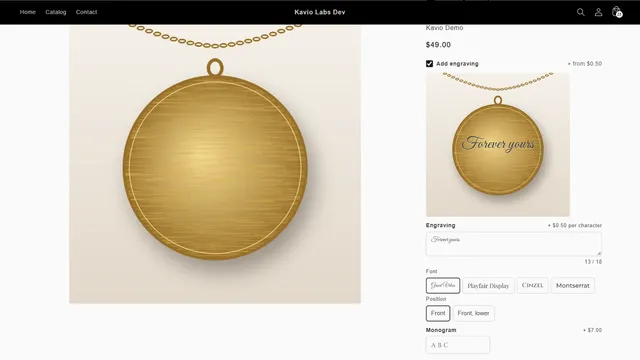
Engraving previewed on the product photo, monogram styles, an add-on price at checkout and a production sheet.
Platforms
 CS-CartAdd-ons and themes for CS-Cart and Multi-Vendor
 OpenCartExtensions and themes for OpenCart 4 and 3
 WooCommercePlugins and themes for WooCommerce
 PrestaShopModules and themes for PrestaShop 8.2 and 9
 ShopifyBuilt for every Shopify plan, billed by Shopify
Stores
Shopify app · Sell by Measure
Shoppers type the exact amount they need, see the price as they type and check out with exactly that amount. Cart, checkout, orders and stock all agree, without draft orders or price overrides.
The problem
Shopify quantities are whole numbers. To sell fabric, cable or coffee by measure, stores create a long list of variants (1 m, 1.5 m, 2 m...) or force shoppers into fixed packs.
Apps that change prices on the fly often rely on draft orders or hidden discounts, so the price on the product page and the price Shopify charges can drift apart.
Sell by Measure
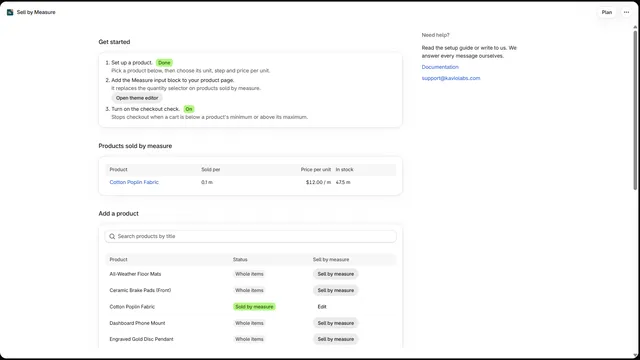
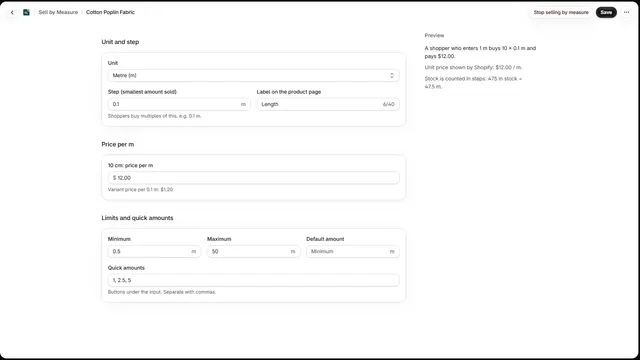
In the app choose the product, the unit (for example metres), the step (0.1 m) and the price per unit ($12.00 / m).
Click "Open theme editor" and add the Measure input block to your product template.
One click adds the checkout rule that enforces your minimum and maximum amounts, even if the cart was edited by hand.
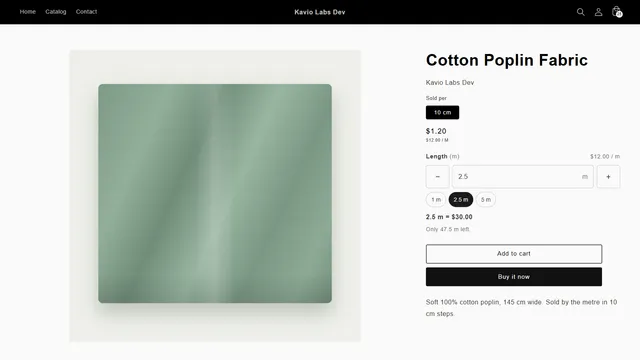
"2.5 m = $30.00" as the shopper types, with quick amount buttons.
kg, g, lb, oz, m, cm, mm, yd, ft, in, m², sq ft, L, ml, m³, gal and fl oz.
"$12.00 / m" in the cart, at checkout and on the order.
50 m of fabric in 10 cm steps is 500 in stock and never oversells.
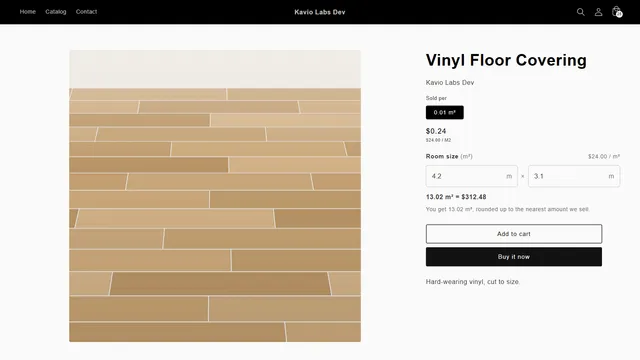
For flooring, glass or turf: shoppers enter the room size and buy the exact area.
A theme app extension served from Shopify’s CDN; our server is never in the shopper’s path.
Sell by Measure
Shopify counts in whole items. There is no native way for a shopper to type 2.5 m of fabric, 1.25 kg of coffee or 3.2 m² of flooring. Merchants usually create a variant per length, or ask shoppers to order 25 units of 10 cm with no price feedback.
Sell by Measure lets shoppers type the amount they need and see the price as they type. You set the unit, the smallest step, a minimum and a maximum. Cart, checkout, orders and stock all show the same amount, in units your team can read.
Shopify quantities must stay whole, so the app works with that rather than around it. A product is sold in steps. With a 10 cm step, 2.5 m is 25 steps, and the variant name and unit price make that clear:
Stock is counted in steps: 50 m with a 10 cm step is 500 in stock. When overselling is off, shoppers cannot ask for more than is left. Shoppers can change the amount in the cart, since the quantity is the number of steps, so any change is still an exact amount.
Because Shopify prices each step like any other item, discounts, taxes and currencies keep working.
| Setting | Example | Meaning |
|---|---|---|
| Unit | m, kg, ft², L | Weight, length, area and volume units. |
| Step | 10 cm | The variant you sell. Its price is the price of one step. |
| Minimum / maximum | 0.5 m / 20 m | Enforced at checkout. |
| Quick amounts | 1 m, 2 m, 5 m | Buttons on the product page. |
| Length × width | On | For area products such as flooring. |
Then add the measure block to the product template in the theme editor. Choosing a step comes down to how you cut: a store that cuts fabric to 10 cm should use 10 cm, while a deli selling by 50 g should use 50 g. A smaller step means larger quantity numbers in the cart.
The free plan covers up to 5 products sold by measure, with all units, the measure block and minimum and maximum checks. Paid plans raise the product limit, and length × width input for area products is on Pro. See the app page for current plans.
| Variants | Draft-order calculator | Sell by Measure | |
|---|---|---|---|
| Any amount | No | Yes | Yes, to your step |
| Normal Shopify checkout | Yes | Often no | Yes |
| Stock in real units | Per variant | Often no | In steps |
| Live price | Fixed | Yes | Yes |
| Minimum at checkout | No | Varies | Yes |
If you sell a few fixed sizes, variants are free and fine. Some calculator apps use draft orders or create new variants per price, which can clutter your product list. This app keeps one step variant and normal checkout.
Our fabric by the metre guide walks through a full setup, and the sell-by-weight comparison covers other platforms. See Sell by Measure on the apps site.
Fabric shops by the metre or yard, haberdashery, cable and rope, garden goods such as soil and gravel, flooring and tiles by area, wallpaper and vinyl, coffee, tea, deli and bulk foods. In each case, tell shoppers on the page how you cut and pack: one continuous piece or several, and whether you add a margin for waste.
For flooring, length × width with a rounded-up amount prevents short orders. For food, check the rules for pack labelling in your market.
Every Shopify plan, with no Plus features. Online Store 2.0 themes with app blocks, such as Dawn and Horizon. It requests only product and validation permissions, and no customer data. On uninstall, the block leaves your theme and the checkout check turns off, and variant prices and unit prices stay as normal Shopify prices.
Before you set up all your products, test one. Add the block to your product template, and make sure it sits near the buy button. Then view the page on a phone, and check that the theme’s own quantity selector does not confuse shoppers. Look at the cart: the variant name and unit price should explain the amount. If your theme hides variant names in the cart, adjust that setting, so "10 cm" stays visible.
Shopify
Sell fabric, cable, deli, flooring and garden goods by the metre, kilo or square foot on Shopify. Exact amount input, live price, honest stock. Free plan.
Shopify
The most requested products on this platform. Each one has its own page, and you can buy it straight on the sales site.
Engraving previewed on the product photo, monogram styles, an add-on price at checkout and a production sheet.
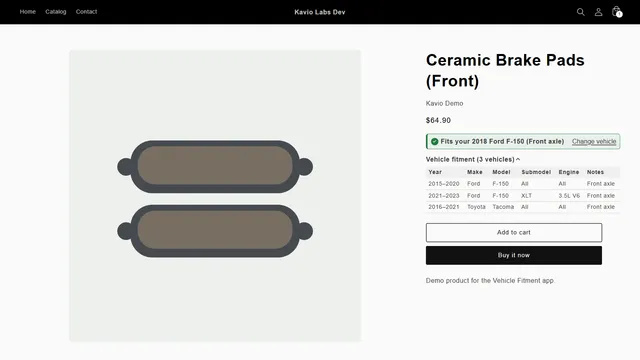
YMM search on your own collection pages, a fit badge on every product, My Garage and CSV import.
Prices, licences, full documentation and instant downloads are on the store.
apps.kaviolabs.com · 5 apps, each with a free plan
Sell by measure
Built natively for each platform, not ported. Each version has its own product page, documentation and price.
CS-Cart
Decimal quantities with a unit, step, presets and price per kg or metre, with exact stock down to 0.001.
Decimal quantities in 15 units, preset buttons, a live line total and exact decimal stock, on OpenCart 4 and 3.
WooCommerce
Decimal quantities like 1.25 kg, quick amounts, length × width and exact decimal stock, with the block checkout.
PrestaShop
Amounts like 1.25 kg or 2.40 m with quick amounts, a live total, exact decimal stock and real shipping weight.
Guide
Guide
How five platforms handle 1.25 kg or 2.5 m, the usual workarounds and what to check before you choose.
Read the guideFAQ
Yes, on every plan. The app uses no Shopify Plus features.
The product is sold in steps, for example 10 cm. 25 steps are 2.5 m, and the variant name and unit price make this clear in the cart, at checkout and on the order.
Yes. Shopify prices each step like any other item, so all Shopify features work as usual.
Up to 5 products sold by measure with every unit, the measure input with live price and the checkout check. Paid plans add more products and length × width.
Yes. The cart quantity is the number of steps, so any change is still an exact amount. The checkout check enforces your minimum and maximum.
Yes. Stock is counted in steps: 50 m with a 10 cm step is 500 in stock.
Yes, for area products on the Pro plan.
The block leaves your theme and the checkout check turns off. Variant prices and unit prices stay as normal Shopify prices.
Plans, screenshots and the full documentation are on apps.kaviolabs.com.
Kavio Labs
The same standards, the same support desk and one licence portal on every platform we build for.